
Construction project management software keeps the schedule, budget, risks and changes of every site in one system, so you see problems before they turn into delays or overruns. The essentials are a Gantt schedule with dependencies, budget versus actual cost by cost type, a register for risks, issues and change requests, resource tracking and a portfolio view across all projects. The main decision after features is where the data lives: in a vendor’s cloud with a yearly subscription, or on your own server with a one-time licence.
What is construction project management software?
It is software that plans and controls construction projects from tender to handover. Unlike a general task app, it has to handle long schedules with dependent phases, large budgets split by cost type, subcontractors and equipment as resources, and a steady stream of changes and issues from the site. Contractors, engineering firms, investors and public utilities use it to answer three questions every week: are we on schedule, are we on budget, and what could stop us?
Which features does a construction project need?
Use this checklist when you compare tools. The right column shows how we cover each point in our own software, Kendo Manager, so you can see what a self-hosted tool typically includes and where you would need something extra.
| Feature | Why it matters on construction projects | In Kendo Manager 5 |
|---|---|---|
| Gantt schedule with dependencies | Phases such as earthworks, structure and installations depend on each other; one delay moves everything after it | Yes, Gantt chart with dependencies and milestones |
| Budget vs actual cost | Overruns must be visible per project and per cost type, not at the end of the year | Yes: budget, planned and actual costs, costs by type |
| Risk register | Ground conditions, permits, weather and supplier delays need owners and mitigation | Yes, risks with priority and status |
| Issues and change requests | Site problems and change orders affect scope, time and money and must be traceable | Yes, separate Issues and Changes modules |
| Resources | Equipment, materials and subcontractors are a large share of the cost | Yes, material and human resources, plan vs consumption reports |
| Time tracking | Labour hours drive payroll and invoicing | Yes, paid and non-paid time per member and task |
| Documents and meetings | Contracts, permits and meeting minutes belong with the project | Yes, documents, files and meetings per project |
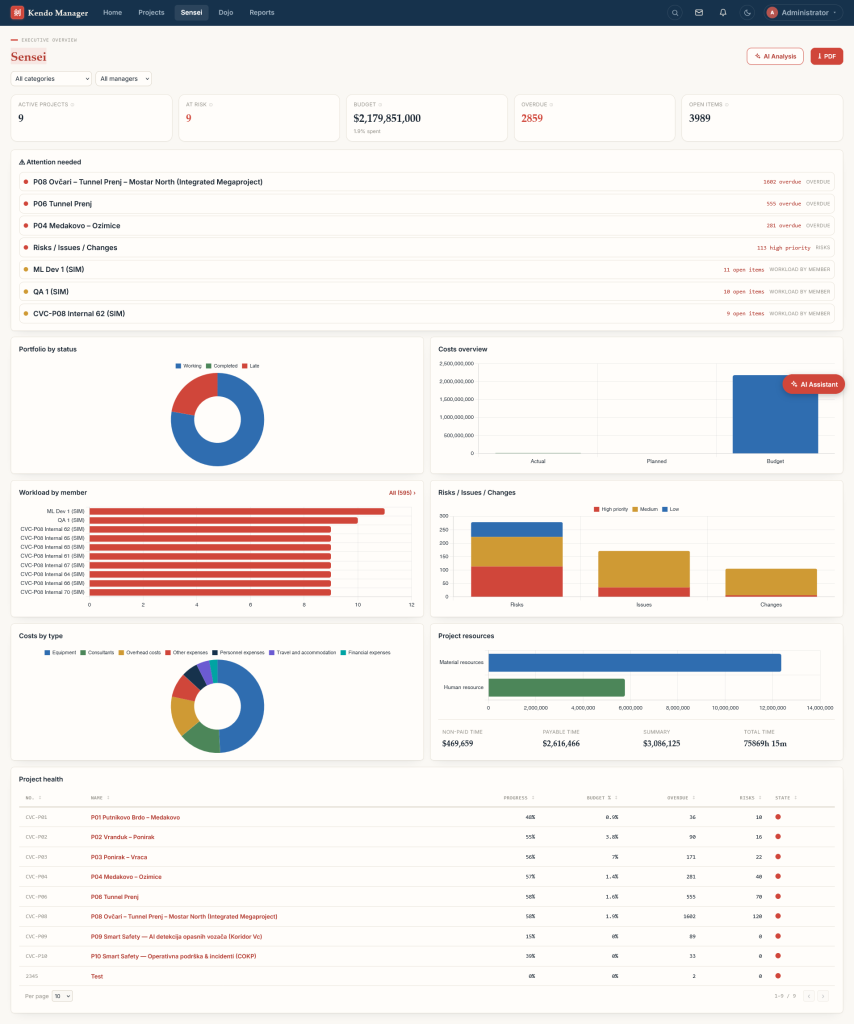
| Portfolio view | Management needs all sites on one screen | Yes, Dojo portfolio and Sensei executive overview |
| Reports for management | Investors and boards want PDF and Excel reports | Yes, portfolio budget, expenses, resources and time reports |
| Drawings, BIM, daily site logs | Design review and field documentation | Not as dedicated modules; files and tasks only, so pair Kendo with your CAD/BIM tools |
Should construction software run in the cloud or on your own server?
Both work; the choice depends on who must control the data and how you prefer to pay.
| Question | Cloud (SaaS) | Self-hosted (on your server) |
|---|---|---|
| Where are budgets, contracts and bids stored? | On the vendor’s servers | On your server or a VPS you control |
| How do you pay? | Annual or monthly subscription | Usually a one-time licence plus optional maintenance |
| Who installs and updates it? | The vendor | Your IT team or the vendor’s support |
| Does it work without internet on site? | No | Yes, inside your local network |
| Fits public utilities and investors with data rules? | Depends on the vendor’s data location | Yes, data stays in your infrastructure |
For a deeper comparison read our guide to self-hosted and on-premise project management.
How is construction project management software priced?
There are three common models:
- Construction-volume pricing. Procore, one of the best-known construction platforms, does not publish fixed prices. Its pricing page says it charges “an upfront annual fee by product and based upon your Annual Construction Volume”, so you request a quote.
- Per-user subscription. Most general project tools charge per user per month. Cost grows with every site engineer and subcontractor you add.
- Perpetual licence. You pay once for a number of users and own that version. Kendo Manager uses this model.
| Kendo Manager package | Users | One-time licence |
|---|---|---|
| Startup | 10 | $749 |
| Office | 20 | $1,249 |
| Business | 50 | $2,499 |
| Business Pro | 100 | $3,799 |
| Professional | Unlimited | $6,299 |
All features are included in every package. From the second year, optional maintenance costs 35% of the licence price per year and covers new versions and support. Example: a contractor with 50 users pays $2,499 for the Business licence plus $874.65 maintenance in years two and three, about $4,248 over three years. Current prices are on kendomanager.com.
How do you keep a construction budget under control?
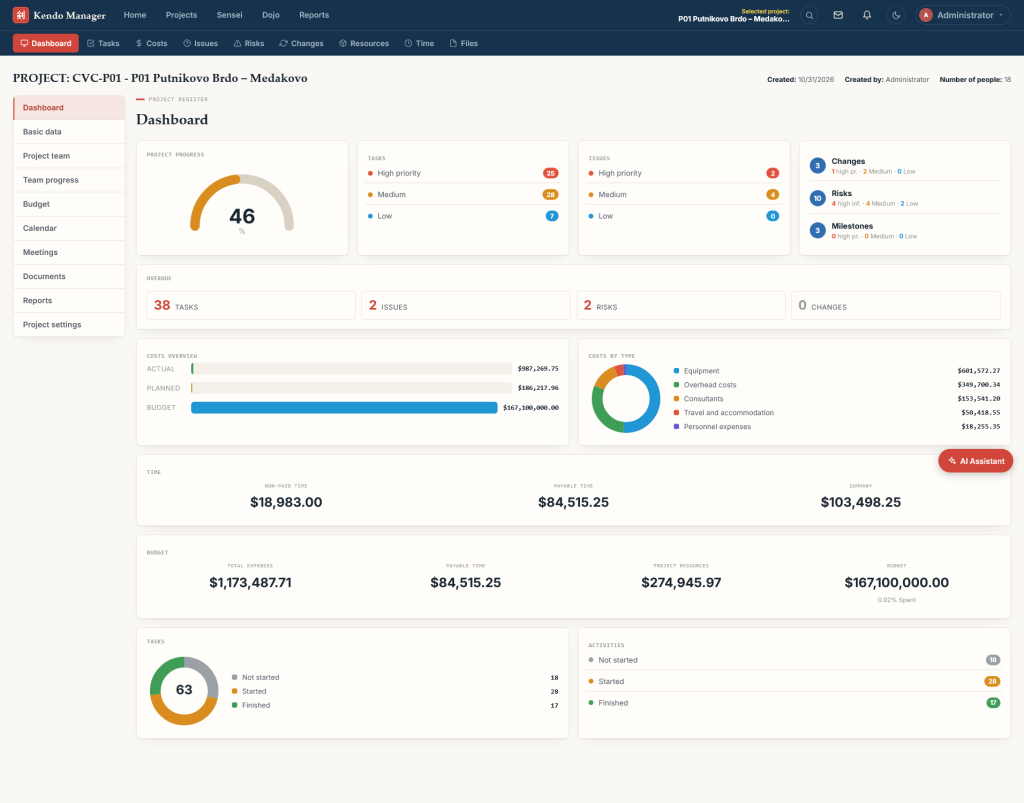
Track three numbers for every project and every cost type: the approved budget, the planned cost of the work scheduled so far, and the actual cost booked. Split costs by type, for example equipment, consultants, overhead, personnel and travel, so you see which part is drifting. Review the gap weekly, not at month end, and link every approved change request to its cost impact.
How do you manage risks, issues and change orders?
Keep three separate registers, because they answer different questions:
- Risks are things that might happen, such as a permit delay. Give each an owner, a priority and a mitigation step.
- Issues are problems that already happened, such as a supplier missing a delivery. Track them to closure with a deadline.
- Changes are requested modifications to scope, time or budget. Record who approved them and what they cost.
An overdue count per register, visible on the project dashboard, shows a site manager in seconds where attention is needed.
How do you plan the construction schedule?
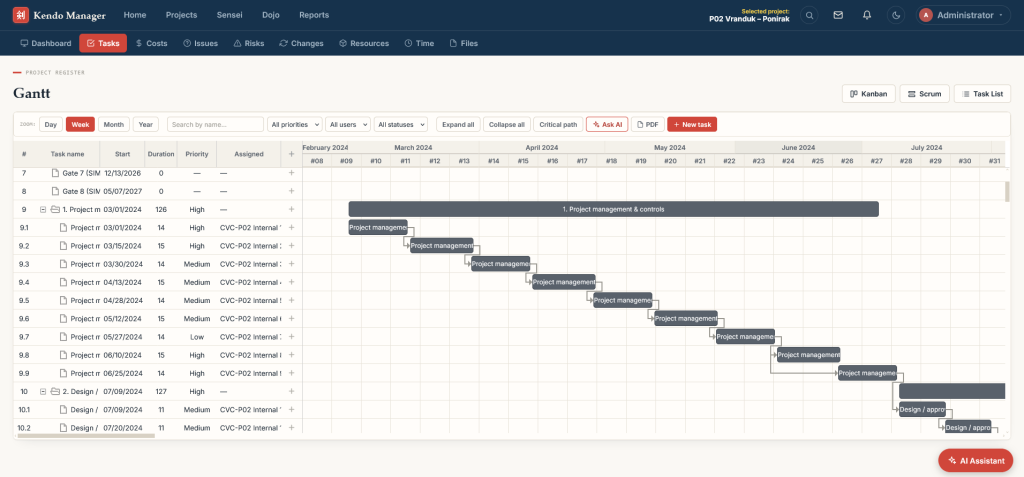
Break the project into phases and tasks, link dependent tasks, set milestones for inspections and handovers, and assign resources. With dependencies in a Gantt chart you can identify the critical path, the chain of dependent tasks that determines the finish date. Any delay on that chain delays the whole project, so those tasks get the closest attention. Our guide to Gantt chart software explains the basics, and for day-to-day task boards see Kanban vs Scrum.
How do you choose the right tool for your company?
- List your projects and users. Count active sites, office staff and site engineers who need access.
- Decide where the data must live. Public utilities and investors often require it on their own infrastructure.
- Check the cost model over three to five years, not only the first-year price.
- Test with one real project. Enter its schedule, budget and current risks and see whether managers can read the status in under a minute.
- Check reporting. Ask for the exact reports your board or investor wants, in PDF and Excel.
- Plan training and support for site staff who are not used to project software.
Is Kendo Manager suitable for construction companies?
Yes, for planning and controlling projects. Kendo Manager runs on your own Windows server or VPS and covers schedule, budget and actual costs, risks, issues, changes, resources, time, documents and portfolio reporting. Our demo data includes tunnel and motorway section projects, so you can see how it handles large infrastructure budgets. It does not replace CAD or BIM software. Version 5 adds an AI assistant that summarizes project status with your own OpenAI, Gemini, Claude or local LLM key; read what is new in Kendo Manager 5 or try the public demo at demo.kendomanager.com (user: demo, password: demo1234).
Need help with implementation? Our project management services cover setup, data import and training.
Frequently asked questions
What is the best construction project management software?
There is no single best tool. Large general contractors often choose construction platforms priced by construction volume, while small and mid-size firms that want control over their data often choose a self-hosted tool with a one-time licence. Compare features, data location and three-year cost.
Can small construction companies use project management software?
Yes. A team of up to 10 users can start with a small package; Kendo Manager also has a free version limited to 10 users and one project.
Does construction project management software work offline?
Cloud tools need an internet connection. A self-hosted system can run inside your local network, so the office keeps working during an internet outage.
What is the difference between construction project management software and ERP?
Project management software plans and controls individual projects: schedule, tasks, risks, changes and project costs. ERP runs company-wide accounting, procurement and payroll. Many firms use both and export project costs to the ERP.
Related reading: SaaS project management software: complete guide · Kendo Manager 5