
Kanban vs Scrum comes down to one question: does your team work in fixed time boxes or in a continuous flow? Scrum delivers work in Sprints of one month or less, with three defined accountabilities and four timeboxed events. Kanban has no Sprints and no prescribed roles; it limits work in progress and improves the flow of items through a visible workflow. Scrum fits product teams that can plan a few weeks ahead. Kanban fits support, operations and any team whose priorities change daily.
What is the difference between Kanban and Scrum?
Scrum is a framework with fixed rules for timing, roles and meetings. Kanban is a strategy for managing flow that you add to the way you already work. The 2020 Scrum Guide defines Sprints as “fixed length events of one month or less”. The Kanban Guide (May 2025) describes Kanban as “a strategy for optimizing the flow of value through a process” and prescribes no iterations at all.
| Attribute | Scrum | Kanban |
|---|---|---|
| Cadence | Fixed Sprints of one month or less | Continuous flow, no iterations |
| Roles | Product Owner, Scrum Master, Developers | None prescribed; existing roles stay |
| Planning | Sprint Planning, max. 8 hours for a one-month Sprint | Work is pulled when capacity frees up |
| Limiting work | Sprint scope is agreed at Sprint Planning | Explicit WIP (work in progress) limits per column |
| Change during the cycle | No changes that endanger the Sprint Goal | Priorities can change at any time |
| Key metrics | Sprint Goal achieved, Increment meets Definition of Done | WIP, throughput, work item age, cycle time |
| Board | Sprint board, reset each Sprint | Persistent board that reflects the real workflow |
| Best for | Product development with a roadmap | Support, maintenance, operations, mixed work |
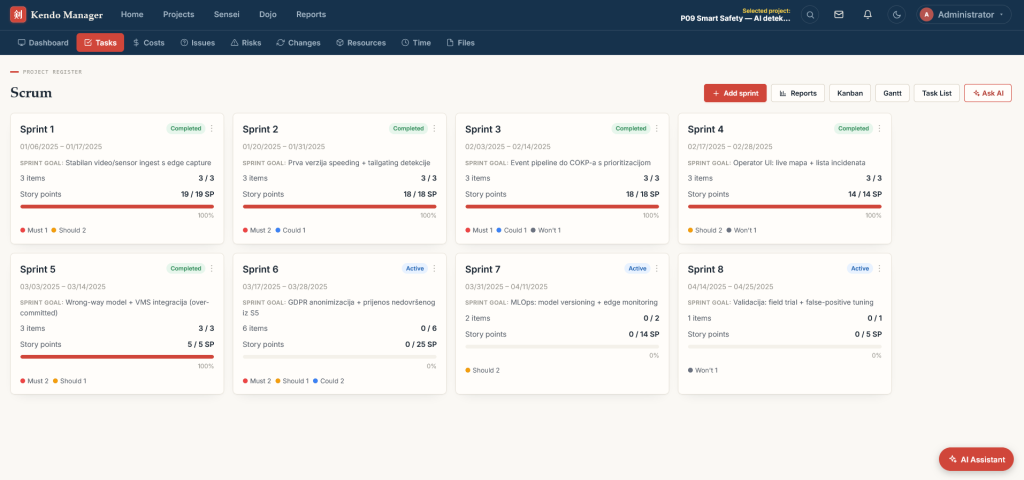
How does Scrum work?
Scrum organizes work into Sprints. A Scrum Team is “typically 10 or fewer people” and has three accountabilities: the Product Owner decides what gets built, the Scrum Master helps the team apply Scrum, and the Developers create the work. Every Sprint has the same four events, with these maximum timeboxes for a one-month Sprint:
| Event | Purpose | Timebox (one-month Sprint) |
|---|---|---|
| Sprint Planning | Choose the Sprint Goal and the work for the Sprint | 8 hours |
| Daily Scrum | Inspect progress toward the Sprint Goal | 15 minutes, every day |
| Sprint Review | Show the result to stakeholders and adapt the backlog | 4 hours |
| Sprint Retrospective | Improve how the team works | 3 hours |
For shorter Sprints, the events are usually shorter. Scrum also has three artifacts, each with a commitment: the Product Backlog has a Product Goal, the Sprint Backlog has a Sprint Goal, and the Increment has a Definition of Done.
How does Kanban work?
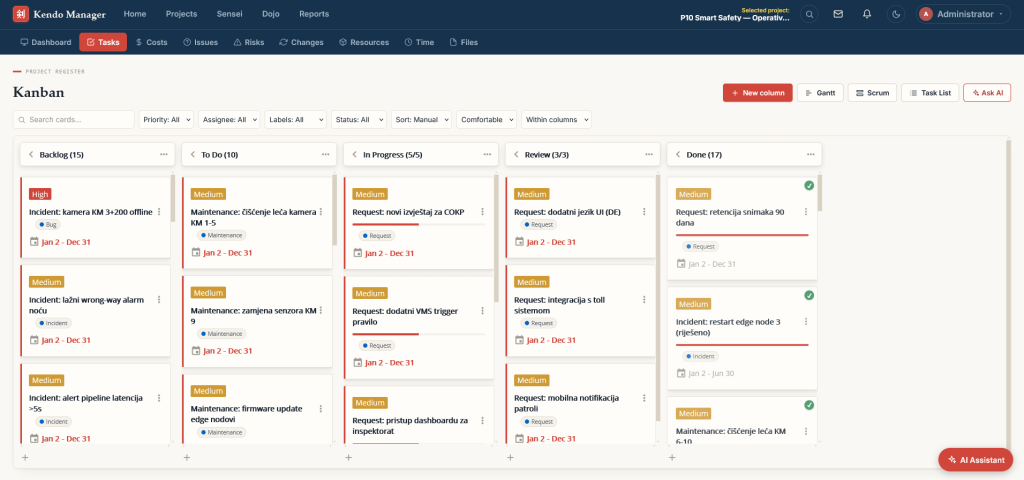
Kanban starts from the process you already have. The Kanban Guide names three practices: defining and visualizing a workflow, actively managing items in that workflow, and improving the workflow. In practice this means a board with one column per stage, an explicit limit on how many items each stage may hold, and a rule for when an item is “done”.
Instead of Sprint commitments, Kanban teams watch four flow measures:
- WIP: how many items are started but not finished.
- Throughput: how many items are finished per day or week.
- Work item age: how long an unfinished item has been in progress.
- Cycle time: how long a finished item took from start to finish.
When WIP goes down, cycle time usually goes down with it, because people stop switching between half-finished tasks. That is the core idea behind the WIP limit.
When should you choose Scrum and when Kanban?
Choose by the shape of your work, not by which method is more popular.
| Your situation | Better fit | Why |
|---|---|---|
| Building a new product or feature set with a roadmap | Scrum | Sprints give a regular rhythm of planning, delivery and feedback |
| Support desk, bug fixing, IT operations | Kanban | Work arrives unpredictably and cannot wait for the next Sprint |
| Small team with frequently changing priorities | Kanban | No Sprint commitment to break when priorities change |
| Stakeholders want a demo every few weeks | Scrum | The Sprint Review is built for exactly that |
| Construction, engineering or public-sector projects with phases | Kanban for tasks, Gantt for the schedule | Fixed milestones and dependencies need a timeline as well as a board |
| Team new to agile, no dedicated Scrum Master | Kanban | You can start with your current process and roles |
Can you combine Kanban and Scrum?
Yes, and many teams do. Combining Scrum events with a Kanban board and WIP limits is often called Scrumban. Mixing methods is common: in Digital.ai’s 17th State of Agile Report, based on 788 respondents in 2023, 42% said their organizations use a hybrid model.
A practical hybrid keeps Sprint Planning, the Sprint Review and the Retrospective, but runs the Sprint on a Kanban board with WIP limits and tracks cycle time alongside the Sprint Goal. Support work can flow through a separate Kanban lane, so urgent tickets do not break the Sprint.
Which mistakes should you avoid?
- Calling a to-do list “Kanban”. Without WIP limits and an explicit workflow, a board is only a list with columns.
- Running Scrum without a Product Owner. If nobody owns the backlog, Sprint Planning turns into negotiation.
- Changing Sprint scope every few days. If that happens often, your work is a better fit for Kanban.
- Measuring only velocity. Story points do not compare across teams. Cycle time and throughput are easier to act on.
- Dropping the Retrospective. Both methods depend on regular improvement of how the team works.
How do you run Kanban and Scrum in Kendo Manager?
Kendo Manager, the self-hosted project management software we develop, has both a Kanban board and a Scrum board, next to Gantt charts, cost tracking and risk management. All features are included in every licence, so you can run Scrum for product work and Kanban for support in the same system, on your own server. Version 5 adds an AI assistant that works with your own OpenAI, Gemini, Claude or local LLM key; read what is new in Kendo Manager 5 or try the public demo at demo.kendomanager.com.
If your projects also have fixed phases and deadlines, combine the board with a timeline. Our guide to free Gantt chart software shows how.
Frequently asked questions about Kanban vs Scrum
Is Kanban or Scrum better for small teams?
For small teams with shifting priorities, Kanban is usually easier, because it needs no new roles and no Sprint commitments. If a small team builds a product and can plan two to four weeks ahead, Scrum works well too; the Scrum Guide sets no minimum team size.
Does Kanban have Sprints?
No. The Kanban Guide prescribes no iterations. Work is pulled into progress whenever the WIP limit allows. Teams can still hold regular reviews, but they are not required.
How long is a Sprint in Scrum?
One month or less. Most teams use one or two weeks. The length stays the same from Sprint to Sprint, so the team builds a predictable rhythm.
Is Scrumban a real method?
Scrumban is the common name for Scrum events combined with Kanban flow practices such as WIP limits. It is not defined in the Scrum Guide or the Kanban Guide, so each team sets its own rules.
Can you switch from Scrum to Kanban?
Yes. Keep your board, add WIP limits per column, stop planning fixed Sprints and start tracking cycle time and throughput. Keep the Retrospective; it remains useful in Kanban.
Related reading: SaaS project management software: complete guide · Self-hosted vs on-premise project management